



Two things in Obby on a Bike that most players never discover:
You can move the camera. Hold right-click and drag. In a game where you're jumping between floating platforms over a bottomless drop, being able to look around before you commit is the difference between a confident jump and a guess.
There's a sprint button. Left Shift. Plenty of gaps simply can't be cleared at walking pace, and players spend ages failing them without realising they were never going fast enough.
Here's everything else — full controls for both players, how the checkpoint system doubles as your coin income, and how to approach the five stages.
What Is Obby on a Bike?
Obby on a Bike is a free 3D bike parkour game by Cursora Labs. It runs in your browser with no download, on desktop and mobile.
You ride a bicycle across floating obstacle courses suspended in the sky — narrow paths, spinning platforms, ramps and gaps, with nothing underneath but open air. The style is borrowed from Roblox-style obby courses, and the goal on each stage is simply to reach the finish without falling.
There are 5 stages, and they get progressively harder. The difficulty curve is gentle rather than spiky, so it never suddenly becomes impossible.
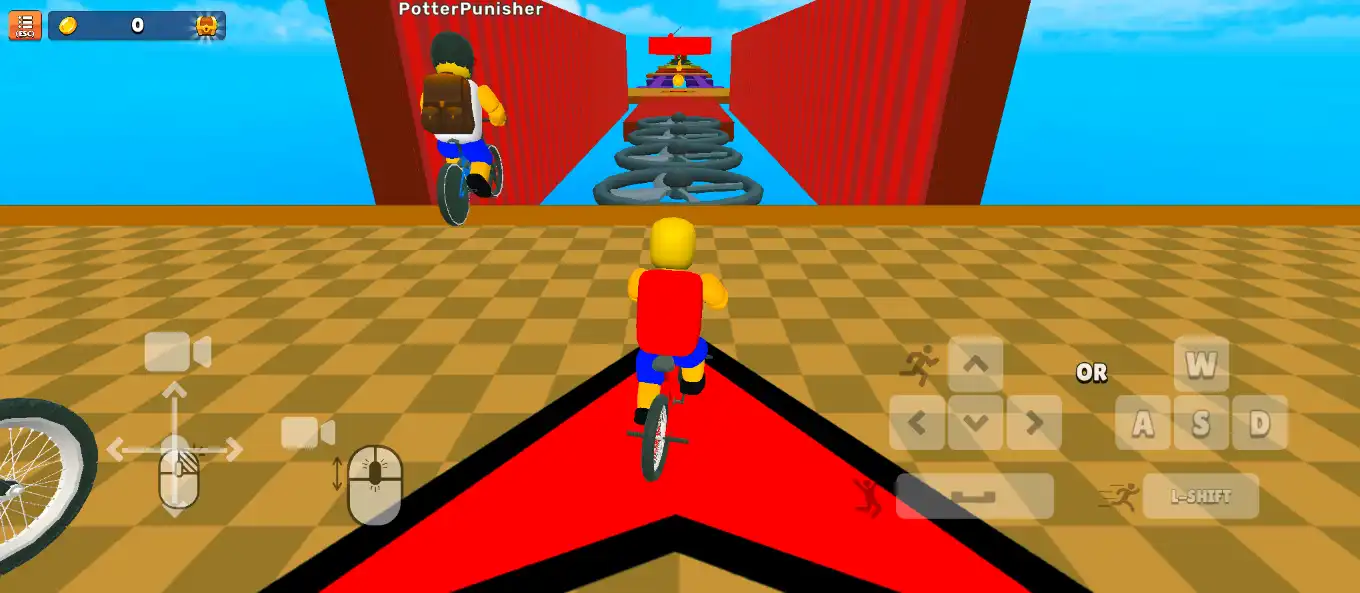
Controls
Player 1
Action | Input |
Move | WASD (or arrow keys in 1-player mode) |
Jump | Spacebar |
Sprint | Left Shift |
Adjust camera | Hold right-click and drag |
Zoom | Mouse scroll |
Player 2 (shared keyboard)
Action | Input |
Move | Arrow keys |
Jump | L |
Sprint | K |
On mobile it's an on-screen joystick and jump button.
Sprint is not optional
Left Shift makes you sprint, and it's the input people most often miss.
Some gaps are simply too wide to clear at normal speed. If you're repeatedly falling short on the same jump no matter how well you time it, you're not sprinting into it. Build speed on the run-up, then jump.
The camera is your best tool
This deserves its own section, because it's the biggest advantage available and almost nobody uses it.
Hold right-click and drag to rotate your view. Scroll to zoom in and out.
Why it matters:
· Blind landings become visible. If you can't see where you're going to land, you're guessing. Rotate the camera until the edge of the target platform is clearly in frame, then jump.
· You can spot better routes. A slight change of angle often reveals a safer approach or a platform you couldn't see from the default view.
· Zoom fixes depth perception. Judging how far away a platform is gets much easier when you adjust how far back the camera sits.
Make this a habit: before every big jump, take a second, drag the view around, and actually look at where you're going. It costs you nothing in Normal mode and saves an enormous number of falls.
Checkpoints Are Also Your Coins
This is the mechanic that shapes how you should play, and it's easy to miss.
Red arrows appear on the ground throughout each stage. Ride over one and it turns green — that's a checkpoint activated.
Two things happen at once:
1. Your progress saves. Fall off the track and you return to the last green checkpoint instead of the start of the stage.
2. There's a coin to collect there. Every checkpoint has one.
So skipping a checkpoint costs you twice — you lose the save point and the coin.
The counter in the top-left corner shows how many coins you still have left to collect on the stage, so you always know if you've missed any.
Practical rule: never ride past a red arrow. Even if it's slightly off your fastest line, the checkpoint alone is worth the detour, and the coin is free money on top.
What Coins Buy
Coins are spent in the main menu, and they go toward:
· New bikes
· Character customisation — hair, face, outfit and clothing colours
· Accessories — hats, glasses, goggles and wings
Most of this is cosmetic, so there's no pressure to grind. But since coins come from checkpoints you'd want to hit anyway, you'll accumulate them naturally just by playing carefully.
The Two Modes
Normal Mode — No timer, no pressure. Ride at your own pace and learn the stage. This is where you should spend your first run through any new level.
Challenge Mode — Adds a time limit. Now you're racing the clock, which means taking the fast line and skipping hesitation. This is where personal bests get set.
The right order: learn the stage in Normal, then run it in Challenge. Attempting a timed run on a course you've never seen just burns attempts.
2-Player Mode
Every stage can be played head-to-head with a friend on the same keyboard.
Player 1 uses WASD, Space and Left Shift. Player 2 uses the arrow keys, L and K. First to the finish wins.
Two practical notes:
· A full-size keyboard makes this far more comfortable. On a compact laptop, WASD and the arrow keys are close enough that two people get in each other's way.
· Agree the keys before you start. Player 2 jumping with L and sprinting with K takes a moment to get used to.
Racing changes how the levels feel entirely — a section you'd normally take carefully becomes a gamble when someone's ahead of you.
Tips That Actually Help
Sprint into wide gaps. If you're falling short repeatedly, speed is the problem, not timing.
Check the camera before every big jump. One second of looking beats five falls.
Hit every red arrow. Checkpoint plus coin, every time.
Learn the stage in Normal before racing it. Knowledge beats reflexes here.
Watch the coin counter. Top-left tells you if you've missed a checkpoint behind you.
Slow down on narrow paths. Sprint is for gaps, not for tightropes. Full speed across a thin beam is how runs end.
Don't panic after a fall. Checkpoints mean you lose seconds, not the whole stage.
Common Problems
I keep falling short on jumps. You're not sprinting. Hold Left Shift on the run-up.
I can't see where I'm landing. Hold right-click and drag the camera until the landing platform is properly in view.
I fall back to the start of the level. You missed a checkpoint. Look for red arrows and ride over them to turn them green.
I'm missing coins. They're at the checkpoints. The top-left counter shows how many you've still got to find.
I keep falling off narrow sections. Stop sprinting on them. Save the speed for gaps.
Player 2's controls feel awkward. L to jump and K to sprint takes practice. Try a couple of practice runs in Normal mode first.
Two people on one keyboard is cramped. A full-size external keyboard genuinely helps.
Keyboard doesn't respond. Click once directly on the game window first. Browser games need focus before they register keystrokes.
Frequently asked questions
Is Obby on a Bike free?
Yes — free in your browser, no download and no account needed. Who made it? Cursora Labs.
Who made it?
Cursora Labs.
How many stages are there?
Five, increasing in difficulty.
What are the controls?
Player 1: WASD to move, Space to jump, Left Shift to sprint, right-click to move the camera. Player 2: arrow keys to move, L to jump, K to sprint.
How do checkpoints work?
Red arrows on the ground turn green when you ride over them. Fall off and you respawn at the last green one.
Where do I get coins?
One at every checkpoint. The counter in the top-left shows how many remain on the stage.
What can I unlock?
New bikes, plus character customisation including hair, face, outfit, clothing colours, hats, glasses, goggles and wings.
What's the difference between Normal and Challenge mode?
Normal has no timer. Challenge adds a time limit for setting records.
Can I play with a friend?
Yes — 2-player mode on the same keyboard, racing to the finish.